< More Mini Books
DLTK's Educational Ideas - Print and Assemble Books
Spring Riddles
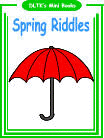 This mini-book has harder words than most making it appropriate for
children in grades 2 and up. The question and answer spring riddles
are fun and motivational reading tools!
This mini-book has harder words than most making it appropriate for
children in grades 2 and up. The question and answer spring riddles
are fun and motivational reading tools!
Feel free to make as many copies as you need (just don't sell them as they're meant to be free for all to use.)
Use our Spring Activities to compliment the mini book.
Materials:
- printer,
- paper (you can use a slightly heavier paper for a longer lasting book)
- stapler
- something to color with (if using B&W template)
Directions:
We have prepared a demonstration video about assembling your mini book. Watch it here.
- Print template of choice. The B&W version is fun for young children to color in or for older children to color as gifts for younger ones. I like printing a color cover and B&W pages.
- Color the template pieces if you are doing the B&W version.
Photos aren't for this book,
but the system works the same.
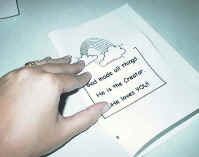
Fold with pictures out
and trim if necessary
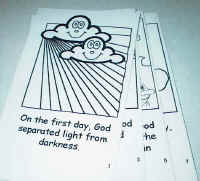
stack with odd
numbers on top
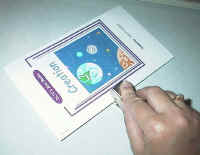
staple
enjoy!
- If you imagine a 'real' book for a second, you know that each page
has printing on the front and the back. We're going to fold
the pages to make it like a real book.
- Ignore the cover for now.
- Fold each page along the center dotted line so the images are on the OUTSIDE and the blank sides of the paper are on the inside (imagine you're making a greeting card).
- You can use a glue stick, if you like, to glue the pages together (WITH THE EXCEPTION OF THE COVER!)
- Stack the pages, so the odd numbers are on top and the folded edges are lined up. Trim with scissors or paper cutter if needed.
COVER PAGE:
- Fold the cover page along the dotted line, again with the images on the outside.
- OPTIONAL: You can laminate the cover page or print it on cardstock if you want it to be more like a real book's cover.
ASSEMBLE THE BOOK:
- Open the cover page (like a folder) and slip the pages inside so that when you open the cover you'll see page 1 -- the unfolded edges of the pages will go against the folded part of the cover.
- Close the cover page and tap the book so everything lines up.
- Put three or four staples along the edge to hold the book together.
- Trim again, if needed.
- Flip through the book once, carefully folding the pages to make the book easier for the children to read.
PRINTING the templates
- Close the template window after printing to return to this screen.
- Set page margins to zero if you have trouble fitting the template on one page (FILE, PAGE SETUP or FILE, PRINTER SETUP in most browsers).
- There'll be less trimming to do if you also turn off the headers and footers.
Text of
the Mini Book
(so you can read through it before printing -- I won't give
away the answers here though)
Pg 1 When do gorillas fall from the sky?
Pg 3 What kind of garden does a baker have?
Pg 5 Can February March?
Pg 7 What did spring say to summer?
Pg 9 Why did the boy start a gardening business?